Maths 2.0
This post has been knocking around my head for a while, I hope it comes out as intended. I think it began to form whilst reading Dan Meyer‘s blog post questioning the use of Web2.0 in instructing Math.
I have been trying to knit together my love of technology into my teaching of Maths ever since I started teaching. However, I still find that I rarely sit pupils in front of a computer and set them on their way. I think this is because, for so many of the topics I teach, I just haven’t found a good reason to use technology over more traditional resources.
I should probably add now that I truly believe that the IT systems in place at my school have hindered my progress. As previously discussed, issues such as filtering and the amount of time it takes to get anything to work in my school hampers enthusiasm and practicality of using IT for teaching and learning purposes. This isn’t a good enough excuse though.
So where does Web 2.0 and IT in general fit into the Maths curriculum of 2009?
Well I can tell you where it does not fit….
It does not fit in making online tests and quizzes, filling VLE‘s with these is madness. I recently attended a training day ran by the SSAT on making interactive resources for Maths. I left feeling disappointed. The majority of the day was spent being shown how to make old fashioned tests/quizzes, either as Flash ‘games’, or as SCORN content for a VLE. This is using new technology to do the same old tricks. Quite often it works less well than the old fashioned pen and paper equivalents. When a pupil completes work for me on paper, I can look at their working and see what mistakes they have made. When completed on a computer, 9 times out of 10, I see if they got it right or wrong, and that’s it. Useful at times, but overall, not good enough. And if I want to use these tools, I’ll buy the material (MyMaths for example), I don’t have time to make it myself, and my results rarely look professional.
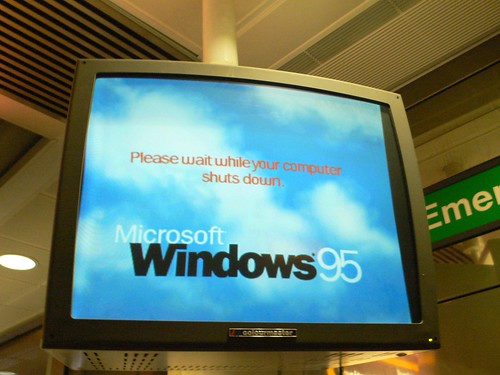
It is also not any piece of software that looks as if it were designed for Windows 95. Autograph, I’m looking at you. Cabri, you too. Walking round BETT last week, I lost track of the number of times I glanced at a stand, took one look at the shoddy looking software and walked on by. I’m sure I missed some great stuff, but time was precious. My pupils won’t put up with something that looks rubbish so why should I?
So what is it then?
Well, I don’t know that either, hence this post.
My attempts at pupil blogging have been limited and poor. This is the bit that has been hardest hit by filtering at school. What use is a blog that can’t link to any content? I know writing about Maths is nothing new, but I do think there is great potential in blogging as a tool for teaching Maths. Pupil engagement and interest is what I’m looking for, and if writing publicly makes them think more then I’m in.
The two areas of Maths that stand out as being made for ICT are Data Handling and Geometry.
I’m determined to use Geogebra more extensively this year. For a free piece of software, it’s outstanding. I honestly prefer it to the more costly alternatives. Geometry really only makes sense when it’s dynamic. I have used Geogebra for instruction before, but I think it is time for the kids to get their hands dirty with this great little tool. With a little guidance and a framework, pupils should be able to discover many of the rules of geometry that they are required to learn for themselves.
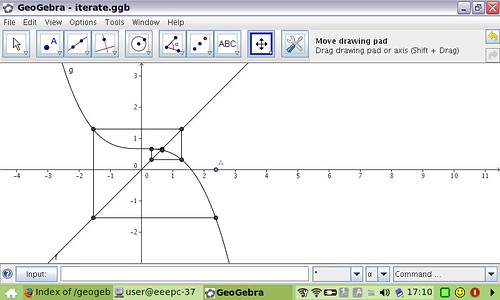
photo credit: Fergus Jones
Google Spreadsheets and Many Eyes both stand out as great ways to explore data online, collaboration at the heart of it. Thanks to Tom Barrett and Kristian Still for inspiration on these tools. Not forgetting the excellent Gapminder. All of these tools make data handling more interesting and relevant. And lets be honest, when did you last analyse data by hand?
But it’s the wonderful world of Number and Algebra that lack obvious tools. I’ve blogged about tutpup.com before, and for basic number work these types of games are fabulous for engagement and learning. But move up the difficulty scale and we head back into lifeless online worksheets with their inherent lack of feedback. Perhaps this is where blogging, podcasting and screencasts are the way forward. I recently came across the excellent screencasts at Mathtrain, along with the Mathcasts at Math Playground they’re great examples of engaging pupils, particularly in these topic areas.
Where next?
How can we develop our Maths pedagogy to embrace new technology? Will tablets with good handwriting recognition help? Algebra will remain an art of the pen until they do. What great ideas / tools have I forgotten all about in this post? What is going on your VLE? How are you using technology to make your Maths teaching better?

Related articles by Zemanta
![Reblog this post [with Zemanta]](http://img.zemanta.com/reblog_e.png?x-id=88d26648-765e-4bf7-9246-65f8f7c9b2bd)